Learn by doing. Launch your career in IT.
Cisco, Linux, IoT and CCTV — on real equipment, guided by experienced mentors. Finish with a certificate and career support.
- Graduates
- 0+ Graduates
- Hands-on
- 0% Hands-on
- Tracks
- 0 Tracks
Lab map
Every node is a course
This isn't decoration — it's the diagram of our lab. Pick a device and the course that teaches it opens up.
Tap or hover a device on the diagram — the course name, price and link appear here.
What will you learn?
Every course includes hands-on lab work on real equipment — from zero to professional level.
Professions
Computer Literacy
Computer basics, MS Office, internet and cybersecurity — from zero to professional level.
- Windows
- MS Office
- Internet
Cisco / MikroTik Networks
Routing, switching, VLAN, VPN and network security. Aligned with the CCNA level.
- CCNA
- VLAN
- VPN
- MikroTik
IP Telephony
VoIP, Asterisk, FreePBX, the SIP protocol and corporate phone system setup.
- Asterisk
- FreePBX
- SIP
Security & CCTV
CCTV installation and configuration. IP cameras, DVR/NVR and monitoring systems.
- IP CCTV
- DVR/NVR
- PoE
Linux Administration
Server management, shell scripting, Docker and DevOps practices.
- Bash
- Docker
- DevOps
Smart Home & IoT
Smart home, Arduino, Raspberry Pi, sensors and automation.
- Arduino
- Raspberry Pi
- Smart Home
Cybersecurity
Network defense: firewalls, VPN, IDS/IPS and the fundamentals of penetration testing.
- Firewall
- VPN
- IDS
- Pentest
DevOps & Containers
Docker, Kubernetes, CI/CD and Ansible — automating modern infrastructure.
- Docker
- Kubernetes
- CI/CD
- Ansible
Windows Server & Active Directory
Domains, users, group policies and core enterprise services.
- Windows Server
- Active Directory
- GPO
Network Monitoring and NOC
Monitor devices with Zabbix, configure alerts and write incident reports.
- Zabbix
- SNMP
- Wireshark
- NetBox
Virtualization and Backups
Virtual servers on Proxmox VE, TrueNAS, RAID and disaster recovery.
- Proxmox VE
- KVM
- TrueNAS
- Backup
Computer Vision and AI Video Analytics
Detecting objects in a camera stream: adding AI to video surveillance with OpenCV and YOLO.
- OpenCV
- YOLO
- AI CCTV
- Edge AI
Skills
SCS — Structured Cabling Systems
A building's cabling system: copper and fiber, crimping, splicing, OTDR measurement and a documented handover — to ISO/IEC 11801 and TIA-568.
- SCS
- Optik tola
- OTDR
- GPON
AI Automation (n8n)
Automating business processes with n8n and APIs: bots, CRM and reports.
- n8n
- API
- Telegram bot
- CRM
Building with AI: Claude Code and Codex
Working with AI agents on a real project: context, MCP, the Git flow and keeping code quality under control.
- Claude Code
- Codex
- MCP
- Git
AI for IT Specialists
Log analysis, writing scripts and configs, documentation — speeding up everyday admin work with AI.
- Claude
- Bash
- Log analysis
- Automation
AI Fundamentals
Working with ChatGPT and Claude, writing good prompts, and solving everyday tasks with text, spreadsheets and images.
- ChatGPT
- Claude
- Prompt
- Office AI
What order should you learn in?
Our courses build on each other. Take them in this order and you go from zero to specialist.
Network and server specialist
From computer basics to building networks and running servers.
Security and video surveillance
On top of networking: designing and installing CCTV systems.
Communications and automation
Corporate telephony and smart devices, built on a network foundation.
Which track fits you?
Answer 5 questions — we'll recommend the right course for you.
What's your current level?
Not memorizing — doing
You learn the theory by working with real equipment.
Real lab environment
Cisco routers, servers, IP cameras — classes run on real hardware, not simulators.
100% hands-on
Every topic is reinforced with a lab exercise you complete yourself.
Experienced mentors
Learn from practitioners who work in the industry.
Certificate
Students who successfully finish a course receive a NETLAB certificate.
Career support
CV preparation, interview practice and support in finding a job.
Free consultation
A specialist helps you pick the right track — free of charge.
What happens when you open a website?
A single request passes through five devices — and you work with every one of them in our lab. Scroll down.
- 01 / 06
The request sets off
The browser uses DNS to turn netlab.uz into an IP address, wraps the request in a packet and sends it onto the network.
- 02 / 06
Local network
The switch forwards the Ethernet frame to the right port by MAC address. VLANs split the office network into isolated segments.
- 03 / 06
Network to network
The router forwards the packet to the next network by IP address, picking the path from its routing table. NAT takes the internal network out to the internet.
- 04 / 06
Inspection
The firewall checks every packet against its rules: HTTPS on port 443 gets through, anything not allowed is dropped.
Where you learn it:CybersecurityComing soon - 05 / 06
The response
A web server on Linux builds the page and sends the response back the same way. All of this takes milliseconds.
- 06 / 06
The whole chain is monitored
A NOC engineer watches it in Zabbix: if any link fails, an alert comes in.
Not a simulator — real equipment
Classes run in our equipped lab. Every topic is reinforced with hands-on work.
- 100%
- Hands-on practice
- Own workstation
- Per student
Network equipment
Wire, configure and troubleshoot routers and switches with your own hands.
- Cisco
- Huawei
- MikroTik
- Fortigate
- NTP
- Konsol (COM)
Optics and structured cabling
Work with fiber and patch cords, and connect SFP modules and GPON equipment.
- Optik tola
- GPON
- SFP modul
- Patch-kord
- Patch panel
Optical test instruments
Measure loss on a fiber line, splice fiber and locate a fault.
- OTDR
- Optical Power Meter
- Payvandlash apparati
- Kabel tester
Servers
Install Linux servers and bring up virtual machines and file services.
- Proxmox VE
- KVM
- TrueNAS
- FreeIPA
- NAS
- RAID
- Ubuntu Server
Monitoring and automation
Put devices under monitoring, configure alerts and automate routine work.
- Zabbix
- SNMP
- Syslog
- NetBox
- Wireshark
- Wazuh
- Ansible
Video surveillance
Connect IP cameras and configure the NVR and recording schedules.
- Hikvision
- Dahua
- IP kamera
- NVR
- PoE switch
Radio and Wi-Fi
Configure Wi-Fi access points and work with radio links.
- Ubiquiti
- Wi-Fi
- Radio aloqa
IP telephony
Build a company PBX and work with extensions and IVR.
- Yeastar
- Asterisk
- FreePBX
- SIP
IoT bench
Wire sensors and relays, and assemble smart home scenarios.
- Arduino
- ESP32
- Raspberry Pi
- Sensor
AI tools
Work with Claude and ChatGPT: prompting, code and documentation.
- Claude
- ChatGPT
Workstations
A separate computer for every student — your own laptop is optional.
- Windows 11
- MS Office
- Packet Tracer
What will you build?
Each project combines several courses and is built on the lab's real equipment — as a capstone.
Corporate office network
Build a small office network from scratch: from wiring the devices to telephony and internet.
- MikroTik
- Cisco
- VLAN
- Fortigate
- Wi-Fi
- Asterisk
Tasks
- Wire the router and switch, and split the network into VLANs
- Configure the Wi-Fi access point and separate a guest network
- Restrict access between segments with firewall rules
- Bring up IP telephony with internal extensions
Courses it builds on
Video surveillance system
Put a site under video surveillance: from camera placement to remote viewing.
- Hikvision
- Dahua
- IP kamera
- NVR
- PoE switch
Tasks
- Connect and place cameras through a PoE switch
- Set the recording schedule and archive retention on the NVR
- Enable motion detection and alerts
- Configure remote viewing securely
Courses it builds on
Server infrastructure
Build the server services an organization runs on, and protect its data from loss.
- Ubuntu Server
- NAS
- RAID
- DNS
- DHCP
- Backup
Tasks
- Install a Linux server and bring services up
- Configure DNS and DHCP on the network
- Build a file server on NAS and RAID
- Take a backup and verify the restore
Courses it builds on
Fiber optic line
From designing the fiber route to handing over a measured, documented line.
- Optik tola
- OTDR
- Optical Power Meter
- Payvandlash
- GPON
Tasks
- Design the fiber route and pull the cable
- Splice the fiber and protect the joint
- Measure loss with an OTDR and a power meter
- Connect the GPON line and hand it over with documentation
Courses it builds on
Smart home bench
Assemble smart home scenarios driven by sensors and connect them to the network.
- ESP32
- Arduino
- Sensor
- Wi-Fi
Tasks
- Wire ESP32 and sensors, and read their data
- Send and store the data on a server
- Write scenarios: temperature, motion and lighting
- Set up control from a phone
Courses it builds on
NETLAB in numbers
Where we stand today: graduates, tracks and the share of hands-on work.
- 0+
- Graduates
- 0+
- Years of experience
- 0%
- Hands-on classes
- 0
- Learning tracks
How it works
From application to certificate — four simple steps.
Apply
Fill in the form or give us a call.
Free consultation
A specialist helps you choose the right track.
Hands-on learning
Learn on real equipment with experienced mentors.
Certificate & job
Finish the course, get your certificate and career support.
A team of practitioner mentors
You learn from specialists working in the industry.
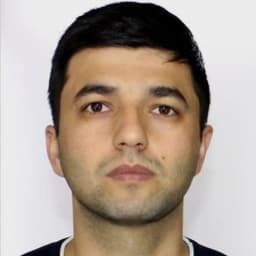
Suxrob Xaydarov
Founder and lead instructor · systems and network engineer
15+ years of hands-on experience
More than 15 years in telecoms and IT. ATSEP engineer at Uzaeronavigatsiya, maintaining air traffic control, communication and navigation systems. Founder of SAM Smart Security Service: 1000+ small and 50+ large projects. Former lead systems administration specialist at the School 21 campus in Samarkand.
Certifications
- MikroTik MTCNA
- MikroTik MTCRE
- MikroTik MTCTCE
- Dahua DHSP
- Linux Essentials
- ATSEP (CNS/ATM)
- MikroTik
- Cisco
- Linux
- Proxmox
- Zabbix
- FortiGate
- VoIP
- CCTV
What our graduates say
Real impressions from people who studied at NETLAB.
“The classes were hands-on from start to finish — we configured routers with our own hands. Theory is immediately reinforced in practice, and that's what I liked most.”
“I started from zero and came in nervous. The mentors patiently answered every question — now I work on a computer with confidence.”
“Working with servers in a real environment was invaluable. After the course I started working in my field.”
Frequently asked questions
Didn't find your answer? Call us or write on Telegram.
Start your IT career today
Leave a request — our specialist will contact you and help you choose the right track.
Leave a request
Fill in the form — we will contact you shortly.